
Getting Started
Install ArchCalc on Linux or Windows and take your first steps.
Welcome to the definitive guide on getting started with ArchCalc.
Installation
ArchCalc is available for Linux and Windows platforms.
Linux
Arch User Repository (AUR) The official package is available on the AUR. Install it using your preferred helper:
yay -S archcalcDirect Download (.deb, .rpm) Pre-compiled binaries for Debian/Ubuntu and Fedora/RHEL derivatives are available on our Releases page.
Flatpak (Coming Soon) ArchCalc will be available on Flathub shortly.
flatpak install archcalcWindows
Download the official Windows installer (.msi or .exe) directly from the Releases page.
Note on Windows SmartScreen: Because ArchCalc is an open-source, independently distributed application, Windows SmartScreen may display an "Unknown Publisher" warning on the first launch. Click More info and then Run anyway to proceed safely.
First Steps
ArchCalc opens on the Dashboard, whose command bar answers almost anything you type:
- Maths:
(85000 - 22000) * 12 - Conversions:
5 km to mi,100 gb in mb - Percentages:
18% of 4999 - Developer commands:
uuid,sha256 hello,base64 encode hello,now
Press Enter to save a result to your History. Use the sidebar to open the scientific Calculator, Workspaces, Converters, Developer Tools, Quote Studio, the System monitor and Settings — see the Feature Tour for a clip of each. Ctrl + Space brings you back to the command bar from anywhere.
Build from source
Prefer to build it yourself? You'll need Node.js 20+, pnpm, Rust and the Tauri prerequisites:
git clone https://github.com/murtazapatel89100/ArchCalc.git
cd ArchCalc/app
pnpm install
pnpm tauri build
Using the Scientific Calculator
ArchCalc features a full scientific calculator with function buttons above the standard number pad.
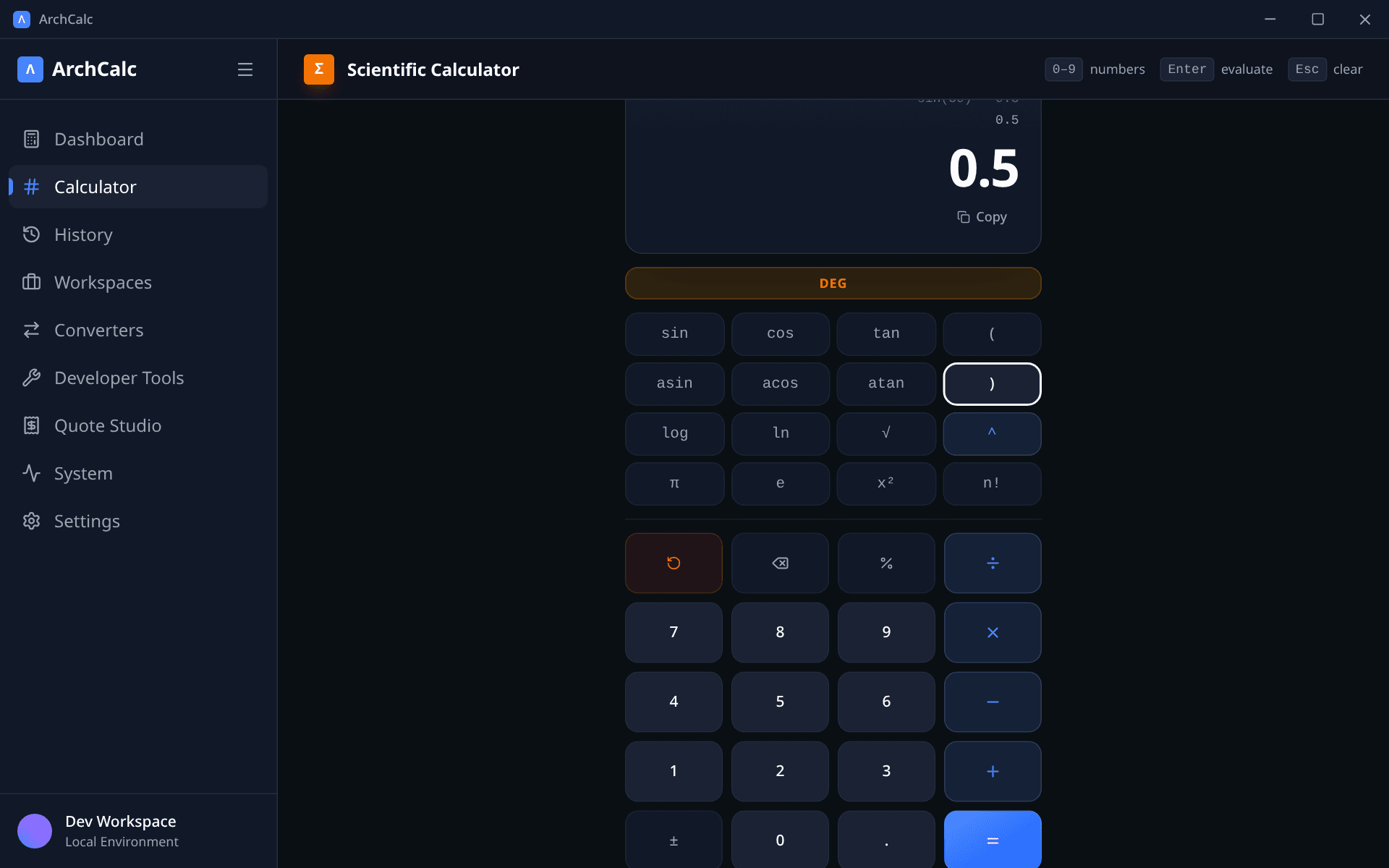
DEG / RAD Mode
Toggle the DEG / RAD pill at the top of the calculator to switch between degree and radian mode for all trigonometric functions. The toggle is amber when degrees are active.
Functions
| Button | Description | Example |
|---|---|---|
sin cos tan | Trigonometric functions (respects DEG/RAD mode) | sin(30) in DEG → 0.5 |
asin acos atan | Inverse trigonometric functions | asin(1) in RAD → 1.5707… |
log | Base-10 logarithm | log(100) → 2 |
ln | Natural logarithm | ln(e) → 1 |
√ | Square root | √(9) → 3 |
^ | Power / exponent | 2^10 → 1024 |
x² | Square shorthand | appends ^2 to the current expression |
n! | Factorial | factorial(5) → 120 |
abs | Absolute value (type manually) | abs(-7) → 7 |
Constants
| Button | Value |
|---|---|
π | 3.14159265358979… |
e | 2.71828182845904… |
Constants can be used directly in expressions: sin(π/2) → 1, ln(e) → 1.
Parentheses & Grouping
Use ( and ) buttons (or keyboard keys) to group sub-expressions: (2+3)*4 → 20.
Keyboard Shortcuts
| Key | Action |
|---|---|
0–9, . | Number input |
+ - * / | Arithmetic operators |
^ | Power |
( ) | Parentheses |
% | Percent |
Enter or = | Evaluate |
Backspace | Delete last character |
Escape | Clear all |